encaustic.com home page Home to the front page of Encaustic.com Shop Online at www.encaustic.com here
Latest new link page
World Suppliers & Importers of Encaustic Art Products
Visit the site of our original sponsor - Michael Bossom
subscribe to the email updates & browse news archives
Discover many step by step image lessons
Learn - find teachers, online courses, etc
Visit the encaustic gallery on this site

Lots of encaustic sites and resources on here

visit the encaustic art image reference collection with technique & product links too
Can't find it? Then search here.
Visit a friendly independant & interactive gallery at www.encaustic-international.com

ONLINE CATALOG
BROWSE & BUY
STARTER SETS
TOOLS
BOOKS & VIDEO
WAX BLOCKS
STAMPS
PAINTING CARD
FINISHING

Adapting the encaustic painting iron for left hand usage

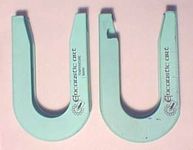
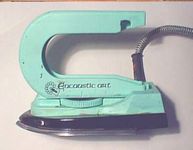
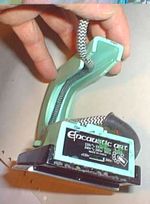
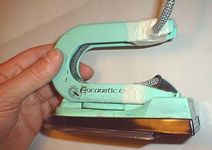
If you are left-handed you may find the flex that comes out of the iron's right-hand side is a problem when working at some angles. Here is a way to adapt the iron using a small saw to cut the plastic and then some tape to secure the flex. Lets hope it helps!
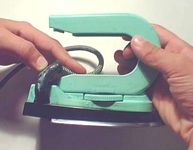
1. Cut a notch in the plastic handle using a small fine saw blade 2. Fix the handle to the iron's base 3. Bend the flex quite tightly into the handle's groove. Hold it there!
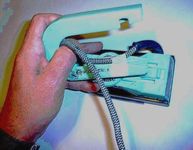
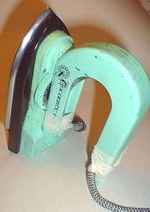
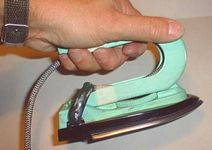
4. Continue holding as you unsnap the handle. Use self adhesive tape to fix the flex roughly in position 5. Re-fix the handle to the base then feed the flex inside and round the groove, finally coming out of the sawn notch 6. Tape the flex firmly into place and the cable should now be out of your way for good

...and finally, if you want even more of the cable out of the way simple wrap it gently around your forearm or even drape it over your left shoulder.

If you have questions on any approaches to encaustic art please feel free to drop us a line to the webmaster below.

..go to the iron product page

7. The iron stands perfectly. 8. Now it's easy for a left-hander!

MAGICAL CREATIVITY Encaustic Art Products SUITABLE FOR ANYONE


 Enjoy Encaustic Art - molten creativity